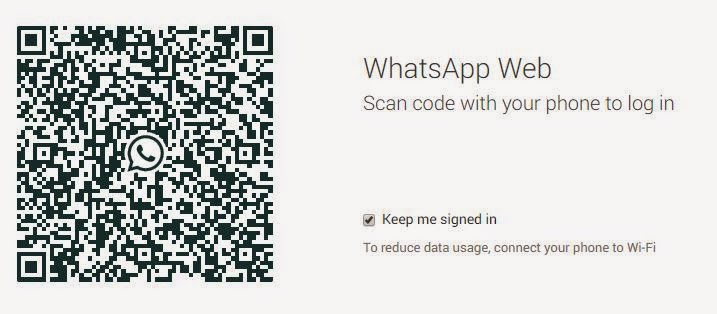
Follow the simple three steps to use it.
Step One:
Step Two:
Step Three:
Use your Google chrome and open https://web.whatsapp.com
Scan it with your mobile camera,
You will be immediately logged in automatically.
That's All..... Enjoy !!!
What you need to know. News, Reviews, Tips and Tricks, Tweaks, Download, Software, and Patches. Much more.
Labels: Free, Tips n Tricks, whatsapp, Windows 7, Windows 8, Windows Server, Windows XP


Labels: Downloads, Free, Internet, Softwares, Tips n Tricks, Tweaks, Windows 7, Windows 8, Windows Server, Windows XP
Single-click the start menu and choose Control Panel.
Single-click the User Accounts icon.
Find the user account you'd like to change the icon for and click on it.
Click the text that says "Change My Picture."
You'll have the option to either pick one of the predefined icons or choose your own.
If you like one of the predefined icons, just highlight the one you like and click the button labeled "Change Picture."
If you'd like to use your own picture, just click the magnifying glass or the text labeled "Browse for more pictures." This will launch a dialog box directing you to navigate to where your new picture is stored. After you find it, just click Open to save your new changes.
Contents From Saim's Blog
Labels: Tips n Tricks, Windows XP
To remove the ability for anyone in the world to pop up messages on your computer,
you can disable the Messenger service.
Labels: Tips n Tricks, Windows XP
As a hedge against being unable to start XP, you can create a boot disk specifically for Windows XP that may allow you to boot the operating system. This can occur when the active partition boot record or other required files become corrupted.
Using Windows XP, place a blank floppy in drive A and format the disk. Navigate to the root folder of the system (in most cases this will be C:\) and copy the following files to the floppy disk.
Boot.ini
NTLDR
Ntdetect.com
If you can't see the files, click [Tools] and [Folder Options...] in the Menu Bar of Windows Explorer. Click the [View] tab and click the radio button next to [Show Hidden Files and Folders]. Remove the check mark next to [Hide Protected Operating System Files (Recommended)] then click [Apply] and [OK]. The files should now be visible in Windows Explorer. If the files still cannot be copied, right click each file, click [Properties] and remove the checkmark from the Read-Only attributes. Reset whatever attributes were unchecked after the copy procedure is completed.
In addition to the files listed above, check the same directory for bootsect.dos and ntbootdd.sys files. If they are present on your system, copy them to the same floppy diskette.
The disk is used as any other boot disk, inserting it into the floppy drive (A:\) and initiating a cold boot. Make sure the BIOS is set so that the A:\ drive is first in the boot sequence.
Contents From Siam's Blog
Labels: Tips n Tricks, Windows XP
1) Navigate to:
HKEY USERS\ .DEFAULT\Control Panel\Desktop
2) Double click the wallpaper value, and type in the full path of your image and the filename.
3) To tile the image set "TileWallPaper" to 1
4) To Stretch the wallpaper set "WallPaperStyle" to 2
5) Close the registry editor and the changes will take place when you Log off.
This could be your favourite image or picture as long as it is a .bmp or .jpg
IMPORTANT: This procedure contains information about modifying the registry. Before you modify the registry, make sure to back it up and make sure that you understand how to restore the registry if a problem occurs. For information about how to back up, restore, and edit the registry, click the following article numbers to view the Microsoft Knowledge Base articles
Contents From Saim's Blog
Labels: Tips n Tricks, Windows XP
To turn on the Windows XP default sound scheme, follow these directions:
Single-click the Start menu.
Single-click the Control Panel.
Single-click the Sounds, Speech, and Audio Devices icon.
If you look under the text labeled "Program events," you'll be able to sample your new sounds or customize them with your own. Read Customize Events Sounds if you'd like to learn how to do this yourself.
Labels: Tips n Tricks, Windows XP
Copyright © 2011 - Technology - Using Blogger
Illacrimo - Design by Design Disease
- Blogger Templates by Blog and Web