Showing posts with label VOIP. Show all posts

Private Internet Access - The Best Safer VPN


Private Internet Access VPN


Private Internet Access is an American-based company that has thousands of servers worldwide and is one of the most trusted names in the VPN space.

Why Choose Private Internet Access?

Private Internet Access has secured its spot as one of the most widespread and well-known Virtual Private Networks on the market. Now in its 7th year, this American-based company has thousands of servers worldwide and continues to be one of the most trusted names in the VPN space.
Private Internet Access

Benefits:

  • Very affordable plans (as low as $3.33 per month)
  • A plethora of security options, and features including Kill Switch and leak protection
  • The privacy policy is great - keeps no logs
  • A huge number of servers means a very consistent and reliable connection
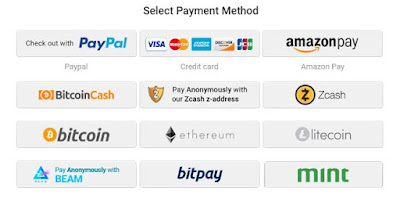
  • Variety of Hassle-Free Payment Methods to choose from.
    (Credit / Debit Card, Paypal, Amazon Pay, Bitcoin, Bitcoin Cash, Zcash, Ethereum, Litecoin, Beam. Bitpay, Mint and many more)
Private Internet Access

Features and Highlights

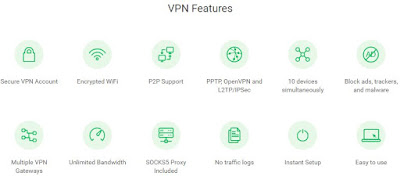
  • Secure VPN Account
  • Encrypted WiFi
  • P2P Support
  • PPTP, OpenVPN and L2TP/IPSec
  • 5 devices simultaneously
  • Block ads, trackers, and malware
  • Multiple VPN Gateways
  • Unlimited BandwidthSOCKS5 Proxy Included
  • No traffic logs
  • Instant Setup
  • Easy to use
Private Internet Access

Pricing and Plans

I had heard through the grapevine that Private Internet Access was one of the most affordable VPNs, and one look at their subscription options confirmed it. Their one-year plan comes out to just $3.33/month, which is half the cost of many VPN competitors. Even their one-month and six-month options are wallet-friendly - $6.95 for a one-month subscription and $5.99/month for 6 months.
Private Internet Access’s pricing is as simple as you can get. Each plan comes with unlimited bandwidth, and access to every PIA feature, such as 5 simultaneous connections and a built-in firewall.
Also, PIA has some unique payment options. In addition to the usual suspects like credit cards and PayPal, they also accept payments using a variety of retail gift cards, from Nordstrom to Starbuck’s.

Tests


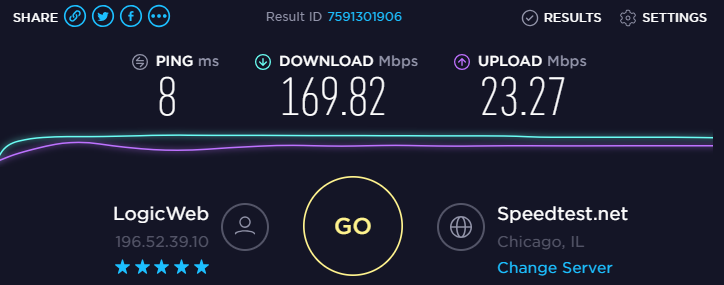
Since latency and download speed can – and often do – vary widely from one VPN to the next, one of the first things I do when trying a new VPN is going over to www.speedtest.net. These were my results before and after turning on Private Internet Access.

As far as security goes, our testing revealed no issues. A test on www.dnsleaktest.com showed our IP was masked correctly. And on www.ipv6leak.com, everything worked as intended.
Private Internet Access

Private Internet Access


Privacy
And as far as privacy goes, PIA doesn’t keep any logs. So, traffic logs, data transfer amounts, and session times aren’t recorded. This is a big plus since many other VPNs do keep a limited amount of logs.

Final Thoughts

Private Internet Access is one of the most well-known and trusted names in the VPN industry for a reason. The company has one of the best privacy policies, great security features, and a high degree of customization - and it’s all offered at a price that few can compete with. That being said, PIA is probably not the best option if you have high-performance needs, like a large amount of torrenting or streaming. The UI isn’t all that user-friendly either. If you don’t plan on using all of the features, and just want something simple, you may want to try it out before buying. Despite some of these shortcomings, I still highly recommend PIA as a complete and reliable VPN


GET DISCOUNTED DEAL NOW

Goautodial 3.3 Recordings not Available Issue - Fix

Identified as Bug #1393,

In this issue Go-admin 3.3 Recordings not available - explained.


  • Recordings not available?
  • Goautodial no recordings found?
  • The Call Recordings File is not appear in Go Admin Recordings?


In the latest release you should use the Lead Search from the List Menu.

The "Recording Search" has been deprecated.

This has been resolved in the latest GIThub codes

Click here to access the link to the solution,

Follow all steps very carefully.

Goautodial 3.3 Released Download Free and Install Guide

Free Download - Install - Update Goautodial 3.3


Free Download Here ISO


Click here for

Goautodial CE 3.3 Time Synchronization Problem - Resolved


Updated: 4th August 2015


There is a time synchronization problem with your system, please tell your system administrator


The major cause for the time sync issue may be one of the following:
  1. The vicidial based system is using MeetMe conference , These MeetMe Conference Bridge requires a timing resources like Dahdi or Zaptel. if they are not loaded properly then time sync error occurs. 
  2. Different timing in server and agent systems 
  3. Wrong time set for DB, PHP or Server Time 
  4. You forgot to update the New server IP for the vicidial /goautodial. 

Troubleshoot 1:

MeetMe Conference dahdi issue

make sure the dahdi/zaptel driver is installed properly

If you are not using any telephony cards then you need to use the dummy drivers

type:
modprobe dahdi_dummy
dahdi_cfg -vvvvv
asterisk -vvvvvr
module unload chan_dahdi.so
module load chan_dahdi.so

Now login as agent and check whether the problem arises
For those using asterisk telephone cards like digium , sangoma ,allo use the below links Digium Sangoma Allo

------------------------------------------------------------------------------------

Troubleshoot 2:

Type "date" in the linux console , it will display the current server time. if the server time and timezone is wrong follow the below commands to change it.

rm /etc/localtime
ln -sf /usr/share/zoneinfo/Asia/Karachi /etc/localtime
rdate -s time-a.nist.gov
chkconfig ntpd on
ntpdate pool.ntp.org
/etc/init.d/ntpd start
------------------------------------------------------------------------------------

Troubleshoot 3:

Check the db time php time from the vicidial report section, if the time is different for all the three then follow the above troubleshoot and reboot the server.

------------------------------------------------------------------------------------

Troubleshoot 4:

If you have changed your server ip, dont forget to run the ip update script.

Type the below command to update:

/usr/share/astguiclient/ADMIN_update_server_ip.pl

and follow the onscreen steps , once done reboot the server and login as agent and check .

Note: if you face any error after executing this command ( eg: Perhaps the DBD::mysql perl module hasn't been fully installed ) Follow Troubleshoot # 7 for the resolution.

------------------------------------------------------------------------------------

Troubleshoot 5:


If you have very big setup of vicidial , then Dahdi_dummy will not be sufficient to provide time source , so you can use the Sangoma voice time sync USB stick

Link:https://wiki.sangoma.com/sangoma-wanpipe-voicetime


------------------------------------------------------------------------------------

Troubleshoot 6:

/usr/sbin/ntpdate -u pool.ntp.org


------------------------------------------------------------------------------------

Troubleshoot 7:

Example errors:

install_driver(mysql) failed: Can’t locate DBD/mysql.pm in @INC (@INC contains: Modules . /usr/lib64/perl5/site_perl/5.8.8/x86_64-linux-thread-multi /usr/lib/perl5/site_perl/5.8.8 /usr/lib/perl5/site_perl /usr/lib64/perl5/vendor_perl/5.8.8/x86_64-linux-thread-

How to Install Perl DBD::MySQL, Use the following manual installation.

Below is the step,

Run from Shell.
perl -MCPAN -e shell (use Auto configurations if prompted)
Type in,
cpan> install DBD::mysql
Wait for the installation.

Thats all!!
------------------------------------------------------------------------------------

Troubleshoot 8: The Last Hope

Some cases are found that goautodial 3.0 was creating time sync issues on some sever hardware.

well in this case, follow these TWO steps only.

Install Goautodial 2.1 on the same server, (there should not be any time issue, if yes, check steps 1 to 6 again)

Download Goautodial 2.1

Installation Guide

Then upgrade it to 3.0 (using upgrade method from below)

Upgrade


I dont know what is the magic in this. but it works :) even when the system and the server time mismatches.

Contents of Step 1 to 5 are taken from Striker24x7

Private Internet Access - The Best Safer VPNGoautodial 3.3 Recordings not Available Issue - FixGoautodial 3.3 Released Download Free and Install GuideGoautodial CE 3.3 Time Synchronization Problem - Resolved ~ Technology