Showing posts with label Tweaks. Show all posts

Skype Recorder Free Full Version Download


iFree Skype Recorder


Your 100% Full Version Skype audio call recorder


iFree Skype Recorder is a powerful and easy-to-use tool for recording Skype calls. You can free use it to record any Skype calls' audio streams.
It has the following advantages:
  • - It's FREE with no limits attached.
  • - Automatic or manual recording capabilities.
  • - Easy to be used in recording any type Skype calls's audio streams.
  • - Choice to record Skype calls different side(Local/Remote).
  • - Store your any Skype calls to MP3 format (Using Lame MP3 Encoder).
  • - Automatically chat reply when you leave computer.
  • - Easy to track record history.
  • - Built-in mp3 player.
  • - Very easy to use.


-OR-


Installation instructions

  • 1, Double click the iFreeRecorder.exe file you have downloaded. Click the "Next" button in the window of the installation program until navigate to the last page. and make sure you have Skpye installed.
  • 2, iFree Skype Recorder will try to connect to Skype on the first start, and will be waiting for authorization. 


  • 3, Click "Allow Access" button to allow iFree Skype Recorder to use Skype when it pop up below message on the Skype.


  • 4, Click "Start Recording" button to record the Skype call when the call connected.


Goautodial 3.3 Recordings not Available Issue - Fix

Identified as Bug #1393,

In this issue Go-admin 3.3 Recordings not available - explained.


  • Recordings not available?
  • Goautodial no recordings found?
  • The Call Recordings File is not appear in Go Admin Recordings?


In the latest release you should use the Lead Search from the List Menu.

The "Recording Search" has been deprecated.

This has been resolved in the latest GIThub codes

Click here to access the link to the solution,

Follow all steps very carefully.

Optimize Your BitTorrent Download Speed

1. Hack the max half-open TCP connections

If you’re on XP sp2, your TCP connections are limited to a maximum of 10. This might hurt your downloading speed because it won't let you connect to as many peers as you want. It is supposed to slow down viruses because their spreading strategy is to connect to a high amount of IP numbers, but it could cripple your torrent downloads.
A nice way to fix this is to download this patch.
Note: Some people report that their antivirus reports the patch to be a Virus, This is not the case. Check out https://www.lvllord.de/ for more details on this
The patch allows you to set the maximum allowed connections to any number you want. Any number between 50 and 100 is ok (more is NOT always better).
Next you need to configure your torrent client to allow 50-100 max half-open TCP connections
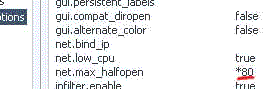
uTorrent: Options > Preferences > Advanced options > net.max_halfopen
tcputorrent
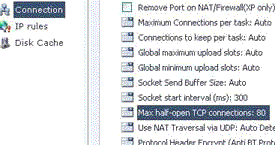
Bitcomet: Options > Preferences > Connection > max half-open TCP
tcpbitcomet
Now you’re ready to go…
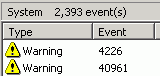
The third point of interest is that some “windows updates” revert your tweaked TCP connections back to 10. So it’s wise to check this every now and then. You can check this by going to (in Windows XP) Start > Control Panel > Administrative Tools > Event Viewer > System… Look for event 4226 (sort by event).
event
For more details about Windows XP SP2 and Event ID 4226 read David Kaspar’s excellent post
If there are a lot of daily occurrences it’s likely that the max amount of half-open TCP connections was set back to 10. Or you’re infected with some nasty spyware…

2. Torrent Client Configuration

In order to apply these tips, you need to know your maximum up- and download speed. You can test your bandwidth over here (stop all download activity while testing). Also, make sure that you applied the tips provided in our previous posts.
Note that there’s a difference between kb/s (kilobits/second) and kB/s (kilobytes/second). To be precise, kB/s = kb/s divided by 8. In this tutorial, we use kB/s (like most torrent clients do). This means that you might need to calculate your max speed in kB/s yourself if the speed test only gives you the results in kb\s (so divide by 8 then).
Settings 1-4 can be found in the options, settings or preference tab of most torrent clients.
1. Maximum upload speed
Probably the most important setting there is. Your connection is (sort of) like a pipeline, if you use your maximum upload speed there’s not enough space left for the files you are downloading. So you have to cap your upload speed.
Use the following formula to determine your optimal upload speed…
80% of your maximum upload speed
so if your maximum upload speed is 40 kB/s, the optimal upload rate is 32kB/s
But keep seeding!
2. Maximum download speed
Although setting your maximum download speed to unlimited may sound interesting, in reality, it will only hurt your connection. If you still want to be able to browse properly, set your maximum download speed to:
95% of your maximum download speed
so if your maximum download speed is 400 kB/s, the optimal download speed is 380kB/s
3. Maximum connected peers per torrent
Yet another setting that you don’t want to max out. I experimented quite a lot with the max connected peer settings and came to the conclusion that both high and low numbers hurt the download speed of a torrent. The following setting worked best for me.
upload speed * 1.3
so if your maximum upload speed is 40 kB/s, the optimal amount of connected peers per torrent is
40 * 1.3 = 52
I didn’t notice a difference for fast or slow connections here.
4. Maximum upload slots
1 + (upload speed / 6)
so if your maximum upload speed is 30 kB/s, the optimal number of upload slots is
1 + (30 / 6) = 6

3. More Tips

Check seeds and peers
A simple tip, but very important. Always look for torrents with the best seed/peer ratio. The more seeds (compared to peers) the better (in general). So 50 seeds and 50 peers is better than 500 seeds and 1000 peers. So, be selective.
Change the default port.
By default, BitTorrent uses a port 6881-6999. BitTorrent generates a lot traffic (1/3), so isp’s like to limit the connection offered on the these ports. So, you should change these to another range. Good clients allow you to do this, just choose anything you like. If you’re behind a router, make sure you have your ports forwarded (portforward.com) or UPnP enabled.
Disable Windows Firewall
It sucks. Windows Firewall hates P2P and often leads a life of it’s own. So disable it and get yourself a decent (free) firewall, Kerio or Zone Alarm for example.
Turn on Encryption
Encrypting your torrents will prevent throttling ISP’s from limiting your BitTorrent traffic. Check out how to enable encryption in Azureus, uTorrent, and Bitcomet, the three most popular torrent clients.
Optimize your internet connection
The TCP optimizer is a freeware utility that optimizes your internet connection. I found it very useful and it helped speeding up my connection for regular internet activity and for downloading torrents. Just download it, and move the slidebar to your maximum download rate (note that it’s in kb/s). Don’t try to set it higher because that will hurt your download speeds!

Contents From : Torrentfreak

Increase Your Internet Speed By 20%


Hello everyone,

If you use Windows XP Professional then it is possible to get extra 20% out of your internet connection.How???Its simple,By default Windows XP Pro holds back 20% of your Internet speed for various services like windows update and spyware checks.

If you want to get back this bandwidth then follow these instructions:

1. Go to Start-> Run-> and type gpedit.msc
2. Go to Administrative Templates branch
3. Expand the Network tab
4. Highlight QoS Packet Scheduler
5. Click on Limit Reservable Bandwidth and check the enabled box
6. Then Change the Bandwidth limit % to 0 %

Once you have done this click apply and restart your PC. After rebooting you should see a noticeable improvement in your net speed.And as always feel free to post comments.

Contents From Saim's Blog

Speed Up Mozilla Fire Fox Amazingly Fast


Hello Everyone,I am back with another trick that will help you out in having faster internet experience.Here is how you can speed up your Mozila Firefox web browser.

1)Open up the configuration variables by typing “about:config” in the address bar and pressing “Enter”.

2) Search for “network .http.pipelining” and set it to “true”.

3) Search for “network.http.proxy.pipelining” and set it to “true”.

4) Search for “network.http.pipelining.maxrequests” and increase it to value like “20 “.Basically, these changes allow the browser to make multiple page requests at the same time.


5)Finally right click any where and slect "NEW" then "INTEGER".Name it "nglayout.initialpaint.delay" and click "OK".Now it prompts for its value enter "0" (without " " ).This is the delay time for display the loaded page in miliseconds.By default its value is 250 ms.

Advance Users Settings

For Broadband:

network.http.max-connections : 64
network.http.max-connections-per-server : 21
network.http.max-persistent-connections-per-server : 8
network.http.pipelining : true
network.http.pipelining.maxrequests : 100
network.http.proxy.pipelining : true

For Dial-up:

browser.cache.disk_cache_ssl : true
browser.xul.error_pages.enabled : true
content.interrupt.parsing : true
content.max.tokenizing.time : 3000000
content.maxtextrun : 8191
content.notify.backoffcount : 5
content.notify.interval : 750000
content.notify.ontimer : true
content.switch.threshold : 750000
network.http.max-connections : 32
network.http.max-connections-per-server : 8
network.http.max-persistent-connections-per-proxy : 8
network.http.max-persistent-connections-per-server : 4
network.http.pipelining : true
network.http.pipelining.maxrequests : 8
network.http.proxy.pipelining : true
nglayout.initialpaint.delay : 750
plugin.expose_full_path : true
signed.applets.codebase_principal_support : true

Then right click anywhere in that window(if your on broadband, this is useless on dialup) and click new>integer with the name "nglayout.initialpaint.delay" and the value "0"

Skype Recorder Free Full Version DownloadGoautodial 3.3 Recordings not Available Issue - FixOptimize Your BitTorrent Download SpeedIncrease Your Internet Speed By 20%Speed Up Mozilla Fire Fox Amazingly Fast ~ Technology