Posted by
M Taha
at
2:34 AM
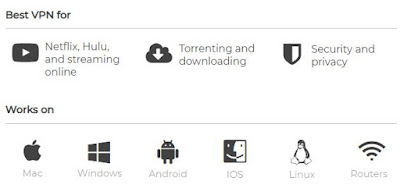
Private Internet Access is an American-based company that has thousands of servers worldwide and is one of the most trusted names in the VPN space.
Why Choose Private Internet Access?
Private Internet Access has secured its spot as one of the most widespread and well-known Virtual Private Networks on the market. Now in its 7th year, this American-based company has thousands of servers worldwide and continues to be one of the most trusted names in the VPN space.
Benefits:
- Very affordable plans (as low as $3.33 per month)
- A plethora of security options, and features including Kill Switch and leak protection
- The privacy policy is great - keeps no logs
- A huge number of servers means a very consistent and reliable connection
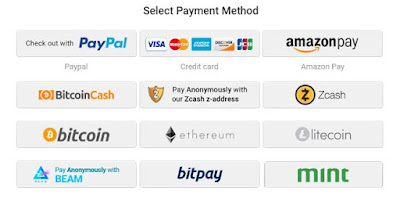
- Variety of Hassle-Free Payment Methods to choose from.
(Credit / Debit Card, Paypal, Amazon Pay, Bitcoin, Bitcoin Cash, Zcash, Ethereum, Litecoin, Beam. Bitpay, Mint and many more)
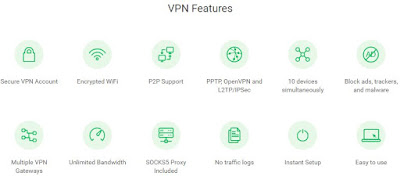
Features and Highlights
- Secure VPN Account
- Encrypted WiFi
- P2P Support
- PPTP, OpenVPN and L2TP/IPSec
- 5 devices simultaneously
- Block ads, trackers, and malware
- Multiple VPN Gateways
- Unlimited BandwidthSOCKS5 Proxy Included
- No traffic logs
- Instant Setup
- Easy to use
Pricing and Plans
I had heard through the grapevine that Private Internet Access was one of the most affordable VPNs, and one look at their subscription options confirmed it. Their one-year plan comes out to just $3.33/month, which is half the cost of many VPN competitors. Even their one-month and six-month options are wallet-friendly - $6.95 for a one-month subscription and $5.99/month for 6 months.
Private Internet Access’s pricing is as simple as you can get. Each plan comes with unlimited bandwidth, and access to every PIA feature, such as 5 simultaneous connections and a built-in firewall.
Also, PIA has some unique payment options. In addition to the usual suspects like credit cards and PayPal, they also accept payments using a variety of retail gift cards, from Nordstrom to Starbuck’s.
Tests
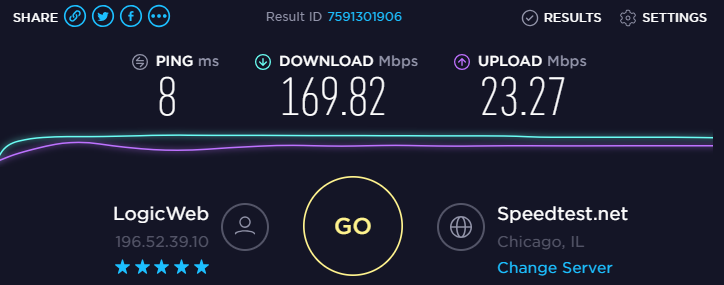
Since latency and download speed can – and often do – vary widely from one VPN to the next, one of the first things I do when trying a new VPN is going over to www.speedtest.net. These were my results before and after turning on Private Internet Access.
As far as security goes, our testing revealed no issues. A test on www.dnsleaktest.com showed our IP was masked correctly. And on www.ipv6leak.com, everything worked as intended.
Privacy
And as far as privacy goes, PIA doesn’t keep any logs. So, traffic logs, data transfer amounts, and session times aren’t recorded. This is a big plus since many other VPNs do keep a limited amount of logs.
Final Thoughts
Private Internet Access is one of the most well-known and trusted names in the VPN industry for a reason. The company has one of the best privacy policies, great security features, and a high degree of customization - and it’s all offered at a price that few can compete with. That being said, PIA is probably not the best option if you have high-performance needs, like a large amount of torrenting or streaming. The UI isn’t all that user-friendly either. If you don’t plan on using all of the features, and just want something simple, you may want to try it out before buying. Despite some of these shortcomings, I still highly recommend PIA as a complete and reliable VPN
Posted by
M Taha
at
9:04 AM
iFree Skype Recorder
Your 100% Full Version Skype audio call recorder
iFree Skype Recorder is a powerful and easy-to-use tool for recording Skype calls. You can free use it to record any Skype calls' audio streams.
It has the following advantages:
- - It's FREE with no limits attached.
- - Automatic or manual recording capabilities.
- - Easy to be used in recording any type Skype calls's audio streams.
- - Choice to record Skype calls different side(Local/Remote).
- - Store your any Skype calls to MP3 format (Using Lame MP3 Encoder).
- - Automatically chat reply when you leave computer.
- - Easy to track record history.
- - Built-in mp3 player.
- - Very easy to use.
-OR-
Installation instructions
- 1, Double click the iFreeRecorder.exe file you have downloaded. Click the "Next" button in the window of the installation program until navigate to the last page. and make sure you have Skpye installed.
- 2, iFree Skype Recorder will try to connect to Skype on the first start, and will be waiting for authorization.
- 3, Click "Allow Access" button to allow iFree Skype Recorder to use Skype when it pop up below message on the Skype.
- 4, Click "Start Recording" button to record the Skype call when the call connected.
Posted by
M Taha
at
1:06 PM

Bandwidth Monitor Pro displays and logs your network adapter's bandwidth usage. It supports logging of all your network adapters at once and has a detailed transfer history. You can let Bandwidth Monitor Pro run in the background, and it will log all your incoming and outgoing traffic for you to view later in the transfer log, or in real-time if you wish.
Version 1.30 may include unspecified updates, enhancements, or bug fixes.
Detailed logging
Supports logging of all your network adapters at once with separate statistics for each adapter. You can go back and check your daily, weekly, monthly, yearly or total transfer.
Always control
With the small transfer graph placed in the system tray, you always have control of your bandwidth usage.
Highly customizable
Bandwidth Monitor Pro can be customized to display the information you want. You can also change the graph type and colors.
Advanced alert system
You can set up rules with various actions and conditions. Let's say that you have a monthly transfer limit of 30GB. You can then set up Bandwidth Monitor Pro to alert you when you are approaching that limit.
System Requirements:
Windows 98/ME/NT/2000/XP or newer
Pentium 100 Mhz or better
32 MB RAM
4 MB Disk space
Download:
Bandwidth Monitor Pro
Posted by
M Taha
at
1:48 PM

Hello everyone,
If you use Windows XP Professional then it is possible to get extra 20% out of your internet connection.How???Its simple,By default Windows XP Pro holds back 20% of your Internet speed for various services like windows update and spyware checks.
If you want to get back this bandwidth then follow these instructions:
1. Go to Start-> Run-> and type gpedit.msc
2. Go to Administrative Templates branch
3. Expand the Network tab
4. Highlight QoS Packet Scheduler
5. Click on Limit Reservable Bandwidth and check the enabled box
6. Then Change the Bandwidth limit % to 0 %
Once you have done this click apply and restart your PC. After rebooting you should see a noticeable improvement in your net speed.And as always feel free to post comments.
Contents From
Saim's Blog
Posted by
M Taha
at
12:25 PM

Hello Everyone,I am back with another trick that will help you out in having faster internet experience.Here is how you can speed up your Mozila Firefox web browser.
1)Open up the configuration variables by typing “about:config” in the address bar and pressing “Enter”.
2) Search for “network .http.pipelining” and set it to “true”.
3) Search for “network.http.proxy.pipelining” and set it to “true”.
4) Search for “network.http.pipelining.maxrequests” and increase it to value like “20 “.Basically, these changes allow the browser to make multiple page requests at the same time.
5)Finally right click any where and slect "NEW" then "INTEGER".Name it "nglayout.initialpaint.delay" and click "OK".Now it prompts for its value enter "0" (without " " ).This is the delay time for display the loaded page in miliseconds.By default its value is 250 ms.
Advance Users Settings
For Broadband:
network.http.max-connections : 64
network.http.max-connections-per-server : 21
network.http.max-persistent-connections-per-server : 8
network.http.pipelining : true
network.http.pipelining.maxrequests : 100
network.http.proxy.pipelining : true
For Dial-up:
browser.cache.disk_cache_ssl : true
browser.xul.error_pages.enabled : true
content.interrupt.parsing : true
content.max.tokenizing.time : 3000000
content.maxtextrun : 8191
content.notify.backoffcount : 5
content.notify.interval : 750000
content.notify.ontimer : true
content.switch.threshold : 750000
network.http.max-connections : 32
network.http.max-connections-per-server : 8
network.http.max-persistent-connections-per-proxy : 8
network.http.max-persistent-connections-per-server : 4
network.http.pipelining : true
network.http.pipelining.maxrequests : 8
network.http.proxy.pipelining : true
nglayout.initialpaint.delay : 750
plugin.expose_full_path : true
signed.applets.codebase_principal_support : true
Then right click anywhere in that window(if your on broadband, this is useless on dialup) and click new>integer with the name "nglayout.initialpaint.delay" and the value "0"
Private Internet Access - The Best Safer VPNSkype Recorder Free Full Version DownloadDownload : Bandwidth Monitor Pro v1.30 (Freeware)Increase Your Internet Speed By 20%Speed Up Mozilla Fire Fox Amazingly Fast ~ Technology