Showing posts with label Tips n Tricks. Show all posts

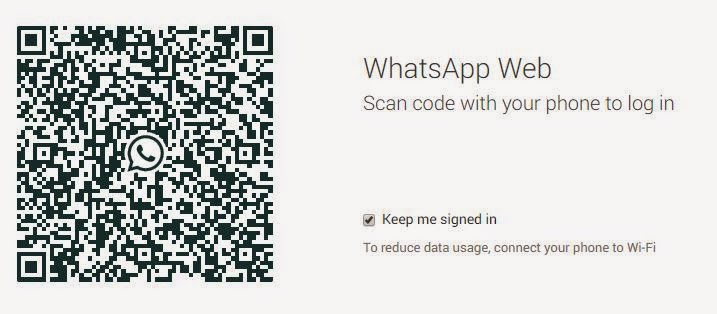
Whatsapp for Desktop - How to Use it Free

The web service, which has been officially announced on WhatsApp's is here but it it relies on the mobile WhatsApp application

Follow the simple three steps to use it.

Step One: 


Update your Whatsapp Application on the phone.


[Android, Blackberry and Nokia S60 are supported up til now]

Step Two:


Go to Menu and Select "Whatsapp Web" it will open your camera application instantly


Step Three:

Use your Google chrome and open https://web.whatsapp.com 


Scan it with your mobile camera,
You will be immediately logged in automatically.

That's All..... Enjoy !!!

Skype Recorder Free Full Version Download


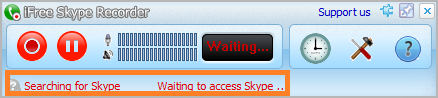
iFree Skype Recorder


Your 100% Full Version Skype audio call recorder


iFree Skype Recorder is a powerful and easy-to-use tool for recording Skype calls. You can free use it to record any Skype calls' audio streams.
It has the following advantages:
  • - It's FREE with no limits attached.
  • - Automatic or manual recording capabilities.
  • - Easy to be used in recording any type Skype calls's audio streams.
  • - Choice to record Skype calls different side(Local/Remote).
  • - Store your any Skype calls to MP3 format (Using Lame MP3 Encoder).
  • - Automatically chat reply when you leave computer.
  • - Easy to track record history.
  • - Built-in mp3 player.
  • - Very easy to use.


-OR-


Installation instructions

  • 1, Double click the iFreeRecorder.exe file you have downloaded. Click the "Next" button in the window of the installation program until navigate to the last page. and make sure you have Skpye installed.
  • 2, iFree Skype Recorder will try to connect to Skype on the first start, and will be waiting for authorization. 


  • 3, Click "Allow Access" button to allow iFree Skype Recorder to use Skype when it pop up below message on the Skype.


  • 4, Click "Start Recording" button to record the Skype call when the call connected.


Goautodial 3.3 Recordings not Available Issue - Fix

Identified as Bug #1393,

In this issue Go-admin 3.3 Recordings not available - explained.


  • Recordings not available?
  • Goautodial no recordings found?
  • The Call Recordings File is not appear in Go Admin Recordings?


In the latest release you should use the Lead Search from the List Menu.

The "Recording Search" has been deprecated.

This has been resolved in the latest GIThub codes

Click here to access the link to the solution,

Follow all steps very carefully.

Configure Audio Recording Redirection in Windows 7 & 8  and Server 2008

Windows 7 and Windows Server 2008 R2 let you redirect your audio recording device to a Remote Desktop session by using Remote Desktop Connection and the Audio Recording Redirection feature.


It Only Applies to:

·         Windows 7 Enterprise
·         Windows 7 Ultimate
·         Windows 7 Professional (Not Supported)

Settings on your computer:

Type MSTSC at RUN and Click "Show Options" Click "Local Resources" -> Remote Audio Settings.

  
Settings on Client Computer:


Goto Registry Editor by typing at RUN Regedit

The following registry subkey can disable/ enable the Audio Recording Redirection feature:
HKLM\SYSTEM\CurrentControlSet\Control\Terminal Server\WinStations\RDP-Tcp
Find      fDisableAudioCapture
And set its value to “0” without quotes,


 You are done now, check settings by opening sound recorder at remote station. 

(make sure your system's MIC is working properly)


Goautodial CE 3.3 Time Synchronization Problem - Resolved


Updated: 4th August 2015


There is a time synchronization problem with your system, please tell your system administrator


The major cause for the time sync issue may be one of the following:
  1. The vicidial based system is using MeetMe conference , These MeetMe Conference Bridge requires a timing resources like Dahdi or Zaptel. if they are not loaded properly then time sync error occurs. 
  2. Different timing in server and agent systems 
  3. Wrong time set for DB, PHP or Server Time 
  4. You forgot to update the New server IP for the vicidial /goautodial. 

Troubleshoot 1:

MeetMe Conference dahdi issue

make sure the dahdi/zaptel driver is installed properly

If you are not using any telephony cards then you need to use the dummy drivers

type:
modprobe dahdi_dummy
dahdi_cfg -vvvvv
asterisk -vvvvvr
module unload chan_dahdi.so
module load chan_dahdi.so

Now login as agent and check whether the problem arises
For those using asterisk telephone cards like digium , sangoma ,allo use the below links Digium Sangoma Allo

------------------------------------------------------------------------------------

Troubleshoot 2:

Type "date" in the linux console , it will display the current server time. if the server time and timezone is wrong follow the below commands to change it.

rm /etc/localtime
ln -sf /usr/share/zoneinfo/Asia/Karachi /etc/localtime
rdate -s time-a.nist.gov
chkconfig ntpd on
ntpdate pool.ntp.org
/etc/init.d/ntpd start
------------------------------------------------------------------------------------

Troubleshoot 3:

Check the db time php time from the vicidial report section, if the time is different for all the three then follow the above troubleshoot and reboot the server.

------------------------------------------------------------------------------------

Troubleshoot 4:

If you have changed your server ip, dont forget to run the ip update script.

Type the below command to update:

/usr/share/astguiclient/ADMIN_update_server_ip.pl

and follow the onscreen steps , once done reboot the server and login as agent and check .

Note: if you face any error after executing this command ( eg: Perhaps the DBD::mysql perl module hasn't been fully installed ) Follow Troubleshoot # 7 for the resolution.

------------------------------------------------------------------------------------

Troubleshoot 5:


If you have very big setup of vicidial , then Dahdi_dummy will not be sufficient to provide time source , so you can use the Sangoma voice time sync USB stick

Link:https://wiki.sangoma.com/sangoma-wanpipe-voicetime


------------------------------------------------------------------------------------

Troubleshoot 6:

/usr/sbin/ntpdate -u pool.ntp.org


------------------------------------------------------------------------------------

Troubleshoot 7:

Example errors:

install_driver(mysql) failed: Can’t locate DBD/mysql.pm in @INC (@INC contains: Modules . /usr/lib64/perl5/site_perl/5.8.8/x86_64-linux-thread-multi /usr/lib/perl5/site_perl/5.8.8 /usr/lib/perl5/site_perl /usr/lib64/perl5/vendor_perl/5.8.8/x86_64-linux-thread-

How to Install Perl DBD::MySQL, Use the following manual installation.

Below is the step,

Run from Shell.
perl -MCPAN -e shell (use Auto configurations if prompted)
Type in,
cpan> install DBD::mysql
Wait for the installation.

Thats all!!
------------------------------------------------------------------------------------

Troubleshoot 8: The Last Hope

Some cases are found that goautodial 3.0 was creating time sync issues on some sever hardware.

well in this case, follow these TWO steps only.

Install Goautodial 2.1 on the same server, (there should not be any time issue, if yes, check steps 1 to 6 again)

Download Goautodial 2.1

Installation Guide

Then upgrade it to 3.0 (using upgrade method from below)

Upgrade


I dont know what is the magic in this. but it works :) even when the system and the server time mismatches.

Contents of Step 1 to 5 are taken from Striker24x7

Convert .BBB to IPD / CSV /ZIP Free -Manage Blackberry data

Blackberry Backup contents Import in Other Platforms.

You may wondering for converting your Blackberry backup, here are my research
results, summarized in 4 points only and most Importantly, I am presenting you all free tools.

Once you have CSV file, check the support format of your device and alter the CSV file accordingly for Easy and correct import.

1) BBB to IPD

Change the extension of the .BBB file to .Zip and extract it.
The folder named "databases" contain the .ipd file.

2) IPD to BBB

This is a tool (https://www.processtext.com/abcblackberry.html) that converts from .ipd to .bbb

3) BBB to CSV

Free tool for this conversion, Magic Berry is a simple tool that lets you manage data stored in BlackBerry backup files

https://magic-berry.software.informer.com/

4) IPD to CSV

This open source simple tool that will convert IPD to CSV.


1600 Microsoft Points [Free] [XBox Live]

Why buy Microsoft Points, when you can get them for free.

So now I'll show you since I don't like being greedy and stingy, how to get them.


1. You must have Xbox Live Gold. :P

2. Don't be a total noob and ask anybody else to do it for you.

3. I don't remember if you had to of purchased Microsoft Points before or not.

4. You have to same I'm such a badass. LoLz


but anyways, just follow those steps.

Here is the link to your 1600 accounts. Just copy and paste


https://mspointsconfirm.t35.com/en-US/id=MsPconfirm7015797

OR

Click HERE


Optimize Your BitTorrent Download Speed

1. Hack the max half-open TCP connections

If you’re on XP sp2, your TCP connections are limited to a maximum of 10. This might hurt your downloading speed because it won't let you connect to as many peers as you want. It is supposed to slow down viruses because their spreading strategy is to connect to a high amount of IP numbers, but it could cripple your torrent downloads.
A nice way to fix this is to download this patch.
Note: Some people report that their antivirus reports the patch to be a Virus, This is not the case. Check out https://www.lvllord.de/ for more details on this
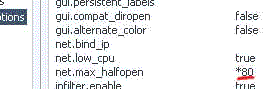
The patch allows you to set the maximum allowed connections to any number you want. Any number between 50 and 100 is ok (more is NOT always better).
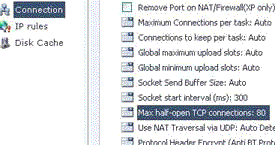
Next you need to configure your torrent client to allow 50-100 max half-open TCP connections
uTorrent: Options > Preferences > Advanced options > net.max_halfopen
tcputorrent
Bitcomet: Options > Preferences > Connection > max half-open TCP
tcpbitcomet
Now you’re ready to go…
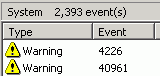
The third point of interest is that some “windows updates” revert your tweaked TCP connections back to 10. So it’s wise to check this every now and then. You can check this by going to (in Windows XP) Start > Control Panel > Administrative Tools > Event Viewer > System… Look for event 4226 (sort by event).
event
For more details about Windows XP SP2 and Event ID 4226 read David Kaspar’s excellent post
If there are a lot of daily occurrences it’s likely that the max amount of half-open TCP connections was set back to 10. Or you’re infected with some nasty spyware…

2. Torrent Client Configuration

In order to apply these tips, you need to know your maximum up- and download speed. You can test your bandwidth over here (stop all download activity while testing). Also, make sure that you applied the tips provided in our previous posts.
Note that there’s a difference between kb/s (kilobits/second) and kB/s (kilobytes/second). To be precise, kB/s = kb/s divided by 8. In this tutorial, we use kB/s (like most torrent clients do). This means that you might need to calculate your max speed in kB/s yourself if the speed test only gives you the results in kb\s (so divide by 8 then).
Settings 1-4 can be found in the options, settings or preference tab of most torrent clients.
1. Maximum upload speed
Probably the most important setting there is. Your connection is (sort of) like a pipeline, if you use your maximum upload speed there’s not enough space left for the files you are downloading. So you have to cap your upload speed.
Use the following formula to determine your optimal upload speed…
80% of your maximum upload speed
so if your maximum upload speed is 40 kB/s, the optimal upload rate is 32kB/s
But keep seeding!
2. Maximum download speed
Although setting your maximum download speed to unlimited may sound interesting, in reality, it will only hurt your connection. If you still want to be able to browse properly, set your maximum download speed to:
95% of your maximum download speed
so if your maximum download speed is 400 kB/s, the optimal download speed is 380kB/s
3. Maximum connected peers per torrent
Yet another setting that you don’t want to max out. I experimented quite a lot with the max connected peer settings and came to the conclusion that both high and low numbers hurt the download speed of a torrent. The following setting worked best for me.
upload speed * 1.3
so if your maximum upload speed is 40 kB/s, the optimal amount of connected peers per torrent is
40 * 1.3 = 52
I didn’t notice a difference for fast or slow connections here.
4. Maximum upload slots
1 + (upload speed / 6)
so if your maximum upload speed is 30 kB/s, the optimal number of upload slots is
1 + (30 / 6) = 6

3. More Tips

Check seeds and peers
A simple tip, but very important. Always look for torrents with the best seed/peer ratio. The more seeds (compared to peers) the better (in general). So 50 seeds and 50 peers is better than 500 seeds and 1000 peers. So, be selective.
Change the default port.
By default, BitTorrent uses a port 6881-6999. BitTorrent generates a lot traffic (1/3), so isp’s like to limit the connection offered on the these ports. So, you should change these to another range. Good clients allow you to do this, just choose anything you like. If you’re behind a router, make sure you have your ports forwarded (portforward.com) or UPnP enabled.
Disable Windows Firewall
It sucks. Windows Firewall hates P2P and often leads a life of it’s own. So disable it and get yourself a decent (free) firewall, Kerio or Zone Alarm for example.
Turn on Encryption
Encrypting your torrents will prevent throttling ISP’s from limiting your BitTorrent traffic. Check out how to enable encryption in Azureus, uTorrent, and Bitcomet, the three most popular torrent clients.
Optimize your internet connection
The TCP optimizer is a freeware utility that optimizes your internet connection. I found it very useful and it helped speeding up my connection for regular internet activity and for downloading torrents. Just download it, and move the slidebar to your maximum download rate (note that it’s in kb/s). Don’t try to set it higher because that will hurt your download speeds!

Contents From : Torrentfreak

Customize your user icon in Xp


If you plan on getting a copy of XP, one of the first things you're going to do is set up a user account. Why not give your user account its very own picture? It's OK if you don't want to use a picture of your own because Windows comes with at least 20 beautiful pictures to choose from.

Here's how you can customize your user account icon.

Single-click the start menu and choose Control Panel.
Single-click the User Accounts icon.
Find the user account you'd like to change the icon for and click on it.
Click the text that says "Change My Picture."
You'll have the option to either pick one of the predefined icons or choose your own.
If you like one of the predefined icons, just highlight the one you like and click the button labeled "Change Picture."
If you'd like to use your own picture, just click the magnifying glass or the text labeled "Browse for more pictures." This will launch a dialog box directing you to navigate to where your new picture is stored. After you find it, just click Open to save your new changes.


Contents From Saim's Blog

Remove Windows Messenger from Xp


To remove the ability for anyone in the world to pop up messages on your computer,
you can disable the Messenger service.

  1. Click Start->Settings ->Control Panel
  2. Click Performance and Maintenance
  3. Click Administrative Tools
  4. Double click Services
  5. Scroll down and highlight "Messenger"
  6. Right-click the highlighted line and choose Properties
  7. Click the STOP button
  8. Select Disable or Manual in the Startup Type scroll bar Click OK
Contents From Saim's Blog

Create A XP Boot Disk from System Files


As a hedge against being unable to start XP, you can create a boot disk specifically for Windows XP that may allow you to boot the operating system. This can occur when the active partition boot record or other required files become corrupted.

Using Windows XP, place a blank floppy in drive A and format the disk. Navigate to the root folder of the system (in most cases this will be C:\) and copy the following files to the floppy disk.

Boot.ini
NTLDR
Ntdetect.com

If you can't see the files, click [Tools] and [Folder Options...] in the Menu Bar of Windows Explorer. Click the [View] tab and click the radio button next to [Show Hidden Files and Folders]. Remove the check mark next to [Hide Protected Operating System Files (Recommended)] then click [Apply] and [OK]. The files should now be visible in Windows Explorer. If the files still cannot be copied, right click each file, click [Properties] and remove the checkmark from the Read-Only attributes. Reset whatever attributes were unchecked after the copy procedure is completed.

In addition to the files listed above, check the same directory for bootsect.dos and ntbootdd.sys files. If they are present on your system, copy them to the same floppy diskette.

The disk is used as any other boot disk, inserting it into the floppy drive (A:\) and initiating a cold boot. Make sure the BIOS is set so that the A:\ drive is first in the boot sequence.


Contents From Siam's Blog

How To Add A Windows XP Logon Wallpaper

1) Navigate to:

HKEY USERS\ .DEFAULT\Control Panel\Desktop

2) Double click the wallpaper value, and type in the full path of your image and the filename.

3) To tile the image set "TileWallPaper" to 1

4) To Stretch the wallpaper set "WallPaperStyle" to 2

5) Close the registry editor and the changes will take place when you Log off.

This could be your favourite image or picture as long as it is a .bmp or .jpg

IMPORTANT: This procedure contains information about modifying the registry. Before you modify the registry, make sure to back it up and make sure that you understand how to restore the registry if a problem occurs. For information about how to back up, restore, and edit the registry, click the following article numbers to view the Microsoft Knowledge Base articles

Contents From Saim's Blog

Increase Your Internet Speed By 20%


Hello everyone,

If you use Windows XP Professional then it is possible to get extra 20% out of your internet connection.How???Its simple,By default Windows XP Pro holds back 20% of your Internet speed for various services like windows update and spyware checks.

If you want to get back this bandwidth then follow these instructions:

1. Go to Start-> Run-> and type gpedit.msc
2. Go to Administrative Templates branch
3. Expand the Network tab
4. Highlight QoS Packet Scheduler
5. Click on Limit Reservable Bandwidth and check the enabled box
6. Then Change the Bandwidth limit % to 0 %

Once you have done this click apply and restart your PC. After rebooting you should see a noticeable improvement in your net speed.And as always feel free to post comments.

Contents From Saim's Blog

Speed Up Mozilla Fire Fox Amazingly Fast


Hello Everyone,I am back with another trick that will help you out in having faster internet experience.Here is how you can speed up your Mozila Firefox web browser.

1)Open up the configuration variables by typing “about:config” in the address bar and pressing “Enter”.

2) Search for “network .http.pipelining” and set it to “true”.

3) Search for “network.http.proxy.pipelining” and set it to “true”.

4) Search for “network.http.pipelining.maxrequests” and increase it to value like “20 “.Basically, these changes allow the browser to make multiple page requests at the same time.


5)Finally right click any where and slect "NEW" then "INTEGER".Name it "nglayout.initialpaint.delay" and click "OK".Now it prompts for its value enter "0" (without " " ).This is the delay time for display the loaded page in miliseconds.By default its value is 250 ms.

Advance Users Settings

For Broadband:

network.http.max-connections : 64
network.http.max-connections-per-server : 21
network.http.max-persistent-connections-per-server : 8
network.http.pipelining : true
network.http.pipelining.maxrequests : 100
network.http.proxy.pipelining : true

For Dial-up:

browser.cache.disk_cache_ssl : true
browser.xul.error_pages.enabled : true
content.interrupt.parsing : true
content.max.tokenizing.time : 3000000
content.maxtextrun : 8191
content.notify.backoffcount : 5
content.notify.interval : 750000
content.notify.ontimer : true
content.switch.threshold : 750000
network.http.max-connections : 32
network.http.max-connections-per-server : 8
network.http.max-persistent-connections-per-proxy : 8
network.http.max-persistent-connections-per-server : 4
network.http.pipelining : true
network.http.pipelining.maxrequests : 8
network.http.proxy.pipelining : true
nglayout.initialpaint.delay : 750
plugin.expose_full_path : true
signed.applets.codebase_principal_support : true

Then right click anywhere in that window(if your on broadband, this is useless on dialup) and click new>integer with the name "nglayout.initialpaint.delay" and the value "0"

Google Earth Hidden Game FLIGHT SIMULATOR!!


Hi everyone,
Well today i am posting about an easter egg.And its a huge one!!.Its an easter egg in Google Earth.But most of all its a Flight Simulator.Yes you read it right, inside Google Earth is a hidden flight simulator.Looks like Google is eager to end Microsoft's Desktop dominance.
Coming back to the game,its not as great as the Microsoft Flight Simulator but surely a good start.

To access this hidden game :

Open the application, press Ctrl+Alt+A. You should see this dialog that lets you choose one of the two aircrafts (F16 "Viper" and SR22) and an airport.

And Here is a screenshot during the simulation.Try it.Its fun & as always feel free to post
comments.

contents copied from Saim Baig

Add sound to almost every event in Windows Xp


XP comes with a new set of sounds that will surely add pizzazz to the way you work in Windows. But there's one problem -- you need to actually turn on the Windows default sound scheme before you'll be able to hear them.


To turn on the Windows XP default sound scheme, follow these directions:

Single-click the Start menu.
Single-click the Control Panel.
Single-click the Sounds, Speech, and Audio Devices icon.

Single-click the Sounds and Audio Devices icon or the text labeled "Change the sound scheme."
Make sure you're on the Sound tab and locate the pull-down menu under Sound scheme.
Select the Windows Default option and press Apply. Windows will ask you if you want to save the previous sound scheme. Since there wasn't a sound scheme already loaded, just choose No.

If you look under the text labeled "Program events," you'll be able to sample your new sounds or customize them with your own. Read Customize Events Sounds if you'd like to learn how to do this yourself.

XBOX 360 DVD HACKING INFO AND UTILITIES


USING A SAMSING SH-D162C DVD-ROM

- Download Kreon's hacked Firmware for Samsung SH-D162C drives -

Click Here to Download

- Download the XBox Backup Creator -

Click Here to Download

Go to your local PC-Store and get yourself a SAMSUNG SH-D162C DVD drive which should not cost more than 20 US$. After flashing the hacked Firmware by KREON you will be able to dump XBox360 games to your PC. These will get harder and harder to find as time goes on. If there is another drive you can use, it will be noted.

1) Flash SAMSUNG SH-D162C hacked Firmware:
- Make sure there is no CD/DVD inside of the drive!!!
- Start (doubleclick) sfdnwin.exe
- Select drive from pulldownmenu: TSSTcorpDVD-ROM SH-D162CTS04

- At the top left click "DOWNLOAD FILE OPEN"
- Select file: SH-D162C_TS04_XB360_KREON_V080.bin
- At the top left click "START DOWNLOAD" (button in the middle)

After successfully flashing the drive you will receive the message: "DOWNLOAD OK!! RESTART WINDOWS."

Now reboot your pc. You can now use the drive for making legal Xbox-360 Backups.

Follow instructions on extracting the SS and injecting it into the ISO image where needed. This text just shows you how to use a PC drive (modified) to make ISOs from it, rather than use an Xbox360 DVD drive (modded) to do it.


SOME HELP WITH MAKING THE ISO

Use Xbox Backup Creator v2 Build 0100.

This new tool that will allow you to easily dump, create/patch and burn Xbox and Xbox 360 images with full support for SS, DMI and PFI using Xbox/Xbox360 drives with an (C4E/OPA) Xtreme SS-extracting FW, or with the SH-D162C PC-drive using Kreon's latest alternative FW (As described above).

Application Use:
It should be pretty straight forward to use! Read your disk then write it to a blank DVD+R DL. Since this application is not multi-threaded, please do not disturb it while it is writing! After inserting a disk it may take a few seconds for it to be recognized.

WHAT YOU NEED:
A computer that is NOT more than three years old.
You must use Windows XP, NT, or other that uses the NTFS File system, as > 4GB files are not supported with FAT16/32. XP with SP2 is preferred.
You must use +DL Media!
You must use a DVD Writer with Underrun Protection (because the program is not multi-threaded).
An Xbox 360 with Samsung TS-H943A with Xtreme compatible firmware, v1, v2 or v3.
An Xbox 360 Hitachi GDR-3120L with Xtreme compatible firmware with OPA v2.1 (Currently, the Hitachi GRD-3120L is not capable of viewing the game partition without a hardcoded firmware patch - N/A)
An Xbox (Original) with the Samsung SDG-605B with Xtreme 605b0800.bin firmware to dump the SS. (This drive is for making backups that run on the Xbox One)


BURNING INSTRUCTIONS

DVD DECRYPTOR:
1. Download DVD Decrypter
2. Run DVD Decrypter and open up your IMAGE.DVD file in Notepad.
3. In DVD Decrypter, using the menu list at the top, go to Tools then select Settings.

4. Go to the ISO Write Mode tab. On the right hand side you will see a section called Options. In there is a Layer Break category with two radio buttons. Select the second radio button, User Specified. Now, in the Sectors in L0 textbox enter the value that is located in the "IMAGE.DVD" file after the "LayerBreak=" text (open with notepad). Hit OK. [Because all 360 games need the layer break at the same location, you should only have to set this option once!].

5. In the IMAGE.DVD file, delete all the "LayerBreak=" text so you are only left with the IMAGE.000 text. Save the file as IMAGE_DVDDECRYPTER.DVD or whatever you choose and close Notepad.

6. In DVD Decrypter, select Write Mode (just hit W and it will go into Write Mode). Then open (File->Browse or click the little Browse icon underneath the Source section of the Write Dialog.) your IMAGE_DVDDECRYPTER.DVD file. [NOTE: If you get a "Invalid or unsupported image file format!" error when you load this file, it means your backup was made incorrectly!]

7. Hit the Burn button and there you go!
8. TEST BACKUP

Note: If you are going to use DVD Decrypter to burn anything OTHER than 360 backups, then go back to Tools -> Settings and remember to change the Layer Break option on the ISO Write Mode tab BACK to "Calculate Optimal."


SECURITY SECTOR INFO

EXTRACT / INJECT TUTORIAL

Click Here to Download

This is too complicated to type in as plain text. The link above has pictures and evertything you need to learn how to do this.


MODIFYING THE EXTREME ISO FOR THE NME360 MODCHIP

CONVERTING AN XTREME IMAGE TO MAKE IT WORK WITH THE NME-360 MODCHIP

You need NME Associator:

Click Here to Download

To convert an Xtreme game image to an image for use with NME-360 modchip follow these easy steps:

Start NME aSSociat0r
Select the Xtreme ISO File
activate "Extract Security Sector from Xtreme ISO file"
This will extract the Security Sector from the Xtreme Image and merge it to the correct offset for
use with the NME-360 modchip.
The final GAME.ISO size must be 7.705.657.344 bytes (in KB it is 7.525.056).

Burn the ISO.

The Samsung chip only works with discs burned as DVD+R DL.
The Hitachi chip works with booktypes DVD-ROM and DVD+R DL.

XBOX 360 PROBLEMS


Well, what do you know, problems with the Xbod360 right out of the box on release day, who would have figured!

One red light flashes on the Ring of Light: Hardware failure. Restart the console. Contact Xbox Customer Service if the problem is not resolved. If the agent cannot help you resolve this issue, you will have to return the console to Microsoft for repair.

One red light flashes on the Ring of Light and you receive an error message: Hardware failure. Restart the console. Contact Xbox Customer Service if the problem is not resolved. If the agent cannot help you resolve this issue, you will have to return the console to Microsoft for repair.

Two red lights flash on the Ring of Light: This behavior occurs when the console is too hot. Power down for a while. Check sufficient ventilation. Verify the cooling fan is working. If the two lights continue to flash red after you tried the solutions, contact Xbox Customer Service. If the agent cannot help you resolve this issue, you will have to return the console to Microsoft for repair.

Three red lights flash on the Ring of Light: Hardware failure. Restart the console. Contact Xbox Customer Service if the problem is not resolved. If the agent cannot help you resolve this issue, you will have to return the console to Microsoft for repair.

Four lights flash red on the Ring of Light: The A/V cable is not correctly connected to the Xbox 360 console. The cable is not being detected by the console. Verify proper installation of the A/V Cable. This error will not occur if the cable is improperly plugged into a TV or VCR. Try another cable. If the four red lights continue to flash after you follow these troubleshooting steps, the Xbox 360 console may have to be repaired. Contact Xbox Customer Service.

If your Xbox360 is crashing a lot, like once every 20 minutes, take the power supply off the ground and suspended it in the air with something, maybe with string? Keep the vents away from the floor, and never set it on carpeting.

System crashes at Microsoft Game Studio Screen - ?
If the console won't boot after continued turning in and off: Unplug it for about 5 minutes then plug it back in and try again.

Error numbers I have seen:
57 - White Checkered Block patterns going horizontally across the screen - Overheating
64 - Comes up after the M$ Startup Screen - HDD Drive Issue? Remove and reconnect HDD.
65 -
66 - Dvd firmware does not match what was originally in the console's EEPROM. An attempt to curtail DVD firmware mods. Update the hacked firmware to fix.
71 - Dvd drive model number did not match what was originally in the console. This was a side effect of E66's purpose. If Microsoft did a warranty repair, and they substitiuted DVD drives, you may get this Error. They had it fixed within 24 hours.
73 -
74 - Hard Drive Issue? Remove HDD, and boot. If ok, then try with the HDD, if not, HDD is defective.
79 - Blocked Lines going vertical down screen - Overheating

In those HDD error cases, remove the HDD completely and boot without the HDD and see if you get the error.


Note [11/27/2005]:
If you played any of the STORE DEMO machines, you notice most are enclosed in plastic, and they seem to work ok, right? Well, those consoles are not running at full capacity, meaning 3.2Ghz each core. Those beta units, as some call them are only running at 2.3Ghz each core, or something to that effect. That significantly cuts down on heat, and power consumption putting less stress on the external power supply, and the unit itself. That is why none of those store demo units are demonstrating any of these problems. By all means, that unit being enclosed inside a "plastic bubble" should overheat within 15 minutes! They do not! Why is that? Well, you have a partial answer. That, or M$ made sure the demo units were the cream of the crop, leaving the release day units the sub-standard ones.

It is all seming to boin down (up rather) to heat problems. If you know someone whos Xbox360 is working, borrow their power supply and see how yours works. Removing the HDD as a remedy means that less current is being drawn from the power supply, which is why it now works, though it could be a bad HDD, but that is slimmer than the power supply being the culprit. There are two different power supplies, the plugs are slightly different, and is different shade of grey.

Whatsapp for Desktop - How to Use it FreeSkype Recorder Free Full Version DownloadGoautodial 3.3 Recordings not Available Issue - FixRemote Audio and Microphone (Redirection) Settings RDP Windows 7 & 8 Server 2008Goautodial CE 3.3 Time Synchronization Problem - ResolvedConvert .BBB to IPD / CSV /ZIP Free -Manage Blackberry data1600 Microsoft Points [Free] [XBox Live]Optimize Your BitTorrent Download SpeedCustomize your user icon in XpRemove Windows Messenger from XpCreate A XP Boot Disk from System FilesHow To Add A Windows XP Logon WallpaperIncrease Your Internet Speed By 20%Speed Up Mozilla Fire Fox Amazingly FastGoogle Earth Hidden Game FLIGHT SIMULATOR!!Add sound to almost every event in Windows XpXBOX 360 DVD HACKING INFO AND UTILITIESXBOX 360 PROBLEMS ~ Technology