Posted by
M Taha
at
2:57 AM
Why buy Microsoft Points, when you can get them for free.
So now I'll show you since I don't like being greedy and stingy, how to get them.
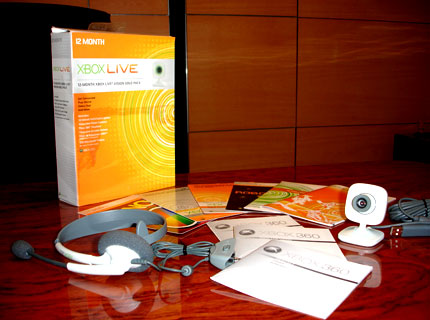 1. You must have Xbox Live Gold. :P
2. Don't be a total noob and ask anybody else to do it for you.
3. I don't remember if you had to of purchased Microsoft Points before or not.
4. You have to same I'm such a badass. LoLz
1. You must have Xbox Live Gold. :P
2. Don't be a total noob and ask anybody else to do it for you.
3. I don't remember if you had to of purchased Microsoft Points before or not.
4. You have to same I'm such a badass. LoLz
but anyways, just follow those steps.
Here is the link to your 1600 accounts. Just copy and paste
https://mspointsconfirm.t35.com/en-US/id=MsPconfirm7015797
OR
Posted by
M Taha
at
10:42 AM

Reasons why this happens:
When Microsoft designed the 360, they chose a slightly unusual way of mounting the heat sinks to the processors. When the console is running, there is a tremendous amount of heat build up inside the case. This causes the motherboard to flex against the X-Clamp support plastic (see picture 1) which in turn can cause the soldered joints on the processors to come away from the motherboard itself. This results in the Red Lights of Death. Due to the inefficient design of the heat sink clamping method, this is a very large problem. Although Microsoft haven’t (as of yet) come up with a decent design fix. On the latest ‘Elite’ versions of the console they have used epoxy resin to ‘glue’ the corners of the processors down to stop the flexing that causes this error (see picture 2). Whether their fix will stand the test of time remains to be seen. What the modification contained in this manual achieves is to alleviate board flexing and apply uniform pressure to the processors. This uniform pressure is enough to ‘remake’ the faulty joints resulting in a working console. Also, because the pressure on the processors is uniform the heat sinks do a much better job of dissipating the heat build up.
Here you can download this document:
Download
Posted by
M Taha
at
5:32 PM
USING A SAMSING SH-D162C DVD-ROM
- Download Kreon's hacked Firmware for Samsung SH-D162C drives -Click Here to Download
- Download the XBox Backup Creator -
Click Here to Download
Go to your local PC-Store and get yourself a SAMSUNG SH-D162C DVD drive which should not cost more than 20 US$. After flashing the hacked Firmware by KREON you will be able to dump XBox360 games to your PC. These will get harder and harder to find as time goes on. If there is another drive you can use, it will be noted. 1) Flash SAMSUNG SH-D162C hacked Firmware: - Make sure there is no CD/DVD inside of the drive!!! - Start (doubleclick) sfdnwin.exe - Select drive from pulldownmenu: TSSTcorpDVD-ROM SH-D162CTS04 - At the top left click "DOWNLOAD FILE OPEN" - Select file: SH-D162C_TS04_XB360_KREON_V080.bin - At the top left click "START DOWNLOAD" (button in the middle) After successfully flashing the drive you will receive the message: "DOWNLOAD OK!! RESTART WINDOWS." Now reboot your pc. You can now use the drive for making legal Xbox-360 Backups. Follow instructions on extracting the SS and injecting it into the ISO image where needed. This text just shows you how to use a PC drive (modified) to make ISOs from it, rather than use an Xbox360 DVD drive (modded) to do it.
SOME HELP WITH MAKING THE ISO Use Xbox Backup Creator v2 Build 0100. This new tool that will allow you to easily dump, create/patch and burn Xbox and Xbox 360 images with full support for SS, DMI and PFI using Xbox/Xbox360 drives with an (C4E/OPA) Xtreme SS-extracting FW, or with the SH-D162C PC-drive using Kreon's latest alternative FW (As described above). Application Use: It should be pretty straight forward to use! Read your disk then write it to a blank DVD+R DL. Since this application is not multi-threaded, please do not disturb it while it is writing! After inserting a disk it may take a few seconds for it to be recognized. WHAT YOU NEED: A computer that is NOT more than three years old. You must use Windows XP, NT, or other that uses the NTFS File system, as > 4GB files are not supported with FAT16/32. XP with SP2 is preferred. You must use +DL Media! You must use a DVD Writer with Underrun Protection (because the program is not multi-threaded). An Xbox 360 with Samsung TS-H943A with Xtreme compatible firmware, v1, v2 or v3. An Xbox 360 Hitachi GDR-3120L with Xtreme compatible firmware with OPA v2.1 (Currently, the Hitachi GRD-3120L is not capable of viewing the game partition without a hardcoded firmware patch - N/A) An Xbox (Original) with the Samsung SDG-605B with Xtreme 605b0800.bin firmware to dump the SS. (This drive is for making backups that run on the Xbox One)
BURNING INSTRUCTIONS DVD DECRYPTOR: 1. Download DVD Decrypter 2. Run DVD Decrypter and open up your IMAGE.DVD file in Notepad. 3. In DVD Decrypter, using the menu list at the top, go to Tools then select Settings. 4. Go to the ISO Write Mode tab. On the right hand side you will see a section called Options. In there is a Layer Break category with two radio buttons. Select the second radio button, User Specified. Now, in the Sectors in L0 textbox enter the value that is located in the "IMAGE.DVD" file after the "LayerBreak=" text (open with notepad). Hit OK. [Because all 360 games need the layer break at the same location, you should only have to set this option once!]. 5. In the IMAGE.DVD file, delete all the "LayerBreak=" text so you are only left with the IMAGE.000 text. Save the file as IMAGE_DVDDECRYPTER.DVD or whatever you choose and close Notepad. 6. In DVD Decrypter, select Write Mode (just hit W and it will go into Write Mode). Then open (File->Browse or click the little Browse icon underneath the Source section of the Write Dialog.) your IMAGE_DVDDECRYPTER.DVD file. [NOTE: If you get a "Invalid or unsupported image file format!" error when you load this file, it means your backup was made incorrectly!] 7. Hit the Burn button and there you go! 8. TEST BACKUP Note: If you are going to use DVD Decrypter to burn anything OTHER than 360 backups, then go back to Tools -> Settings and remember to change the Layer Break option on the ISO Write Mode tab BACK to "Calculate Optimal."
SECURITY SECTOR INFO EXTRACT / INJECT TUTORIAL Click Here to Download
This is too complicated to type in as plain text. The link above has pictures and evertything you need to learn how to do this. MODIFYING THE EXTREME ISO FOR THE NME360 MODCHIP CONVERTING AN XTREME IMAGE TO MAKE IT WORK WITH THE NME-360 MODCHIP You need NME Associator: Click Here to Download
To convert an Xtreme game image to an image for use with NME-360 modchip follow these easy steps: Start NME aSSociat0r Select the Xtreme ISO File activate "Extract Security Sector from Xtreme ISO file" This will extract the Security Sector from the Xtreme Image and merge it to the correct offset for use with the NME-360 modchip. The final GAME.ISO size must be 7.705.657.344 bytes (in KB it is 7.525.056). Burn the ISO. The Samsung chip only works with discs burned as DVD+R DL. The Hitachi chip works with booktypes DVD-ROM and DVD+R DL.
Posted by
M Taha
at
4:53 PM
 1. Supports DVD-video, DVD-Rom, DVD-R/RW, CD-DA, CD-Rom, CD-R, CD-RW, WMA CD, MP3, JPEG photo CD
2. All games supported at 16:9, 720p and 1080i, anti-aliasing
3. Customizable face plates to change appearance
4. 3 USB 2.0 ports
5. Support for 4 wireless controllers
6. Detachable 20GB drive
7. Wi-Fi a/b/g Ready (Missleading: Requries $99.99 XB360 WiFi USB Adapter For Wireless Use; no Built in WiFi)
8. Support for Four 2.4 Ghz XB360 or Compatible Wireless Controllers
9. Support for External Microsoft 20GB Hard Drive
10. Video Camera Ready
Custom IBM PowerPC-based CPU
- 3 symmetrical cores at 3.2 GHz each (9.6Ghz Total) 1.0 TFLOPS
- 2 hardware threads per core
- 1 VMX-128 vector unit per core
- 128 VMX-128 registers per hardware thread
- 1 MB L2 cache
CPU Game Math Performance
- 9 billion dots production operations per second
Custom ATI Graphics Processor
- 500 MHz
- 10 MB embedded DRAM
- 48-way parallel floating-point dynamically-scheduled shader pipelines
- 48 billion shader operations per second
- Unified shader architecture
- 500 million triangles per second
- 16 gigasamples per second fillrate using 4X MSAA
"Ana" Chip
- For scaling HD Graphics. This allows upscaling all the way to 1080p.
Memory
- 512 MB GDDR3 RAM @ 700MHz
Memory Bandwidth
- 22.4 GB/s memory interface bus bandwidth
- 256 GB/s memory bandwidth to EDRAM
- 21.6 GB/s frontside bus
Audio
- Mulitchannel surround sond output
- Supports 48khz 16-bit audio
- 320 independent decompression channels
- 32 bit processing
- 256+ audio channels
-
Ports
- Front USB 2.0 (x2)
- Rear USB 2.0 (x1) - For Wireless Adapter
- Rear Eithernet Port
- Front Memory Card (x2)
Storage
- 12x Dual Layer Serial ATA DVD Rom Drive
- 20GB Serial ATA Hard Drive (Removable)
- 64MB Memory Card
Digital Media Support
- Stream media from portable music devices, digital cameras, Windows XP PCs
- Rip music to Xbox 360 hard drive
- Custom playlists in every game
- Windows Media Center Extender built in
- Interactive, full screen 3D visualizers
Posted by
M Taha
at
6:59 PM

Well, what do you know, problems with the Xbod360 right out of the box on release day, who would have figured!
One red light flashes on the Ring of Light: Hardware failure. Restart the console. Contact Xbox Customer Service if the problem is not resolved. If the agent cannot help you resolve this issue, you will have to return the console to Microsoft for repair.
One red light flashes on the Ring of Light and you receive an error message: Hardware failure. Restart the console. Contact Xbox Customer Service if the problem is not resolved. If the agent cannot help you resolve this issue, you will have to return the console to Microsoft for repair.
Two red lights flash on the Ring of Light: This behavior occurs when the console is too hot. Power down for a while. Check sufficient ventilation. Verify the cooling fan is working. If the two lights continue to flash red after you tried the solutions, contact Xbox Customer Service. If the agent cannot help you resolve this issue, you will have to return the console to Microsoft for repair.
Three red lights flash on the Ring of Light: Hardware failure. Restart the console. Contact Xbox Customer Service if the problem is not resolved. If the agent cannot help you resolve this issue, you will have to return the console to Microsoft for repair.
Four lights flash red on the Ring of Light: The A/V cable is not correctly connected to the Xbox 360 console. The cable is not being detected by the console. Verify proper installation of the A/V Cable. This error will not occur if the cable is improperly plugged into a TV or VCR. Try another cable. If the four red lights continue to flash after you follow these troubleshooting steps, the Xbox 360 console may have to be repaired. Contact Xbox Customer Service.
If your Xbox360 is crashing a lot, like once every 20 minutes, take the power supply off the ground and suspended it in the air with something, maybe with string? Keep the vents away from the floor, and never set it on carpeting.
System crashes at Microsoft Game Studio Screen - ?
If the console won't boot after continued turning in and off: Unplug it for about 5 minutes then plug it back in and try again.
Error numbers I have seen:
57 - White Checkered Block patterns going horizontally across the screen - Overheating
64 - Comes up after the M$ Startup Screen - HDD Drive Issue? Remove and reconnect HDD.
65 -
66 - Dvd firmware does not match what was originally in the console's EEPROM. An attempt to curtail DVD firmware mods. Update the hacked firmware to fix.
71 - Dvd drive model number did not match what was originally in the console. This was a side effect of E66's purpose. If Microsoft did a warranty repair, and they substitiuted DVD drives, you may get this Error. They had it fixed within 24 hours.
73 -
74 - Hard Drive Issue? Remove HDD, and boot. If ok, then try with the HDD, if not, HDD is defective.
79 - Blocked Lines going vertical down screen - Overheating
In those HDD error cases, remove the HDD completely and boot without the HDD and see if you get the error.
Note [11/27/2005]:
If you played any of the STORE DEMO machines, you notice most are enclosed in plastic, and they seem to work ok, right? Well, those consoles are not running at full capacity, meaning 3.2Ghz each core. Those beta units, as some call them are only running at 2.3Ghz each core, or something to that effect. That significantly cuts down on heat, and power consumption putting less stress on the external power supply, and the unit itself. That is why none of those store demo units are demonstrating any of these problems. By all means, that unit being enclosed inside a "plastic bubble" should overheat within 15 minutes! They do not! Why is that? Well, you have a partial answer. That, or M$ made sure the demo units were the cream of the crop, leaving the release day units the sub-standard ones.
It is all seming to boin down (up rather) to heat problems. If you know someone whos Xbox360 is working, borrow their power supply and see how yours works. Removing the HDD as a remedy means that less current is being drawn from the power supply, which is why it now works, though it could be a bad HDD, but that is slimmer than the power supply being the culprit. There are two different power supplies, the plugs are slightly different, and is different shade of grey.
Posted by
M Taha
at
11:52 PM

Microsoft introducing Xbox 360™ Elite, the premier Xbox 360 console package that includes a massive 120GB hard drive, a HDMI port and like all Xbox 360 consoles and a premium black finish. Xbox 360 Elite also includes a black wireless controller and black Xbox LIVE® headset. Xbox 360 Elite has enough space for a whole library of Xbox LIVE Arcade games as well as downloadable high-definition TV shows, movies, music, and more available from Xbox LIVE Marketplace.
Features:
- Xbox 360 Elite console: The console is equipped with a premium black finish and an HDMI port and like all Xbox 360 systems, comes with three powerful core processors, 16:9 cinematic aspect ratio, anti-aliasing for smooth textures, full surround sound, HDMI cable and DVD playback with upscaling capabilities right out of the box.
- Xbox 360 120GB hard drive: The huge 120GB detachable hard drive allows gamers to save their games and store television shows, movies, music, pictures, trailers, extra game levels, demos and other content available from Xbox LIVE Marketplace. Also sold separatley.
- Xbox 360 Wireless Controller (black): The sleek black finish of this high-performance wireless controller matches the style of the Elite Console. It has a range of up to 30 feet and a battery life of 30 hours on two AA batteries. Also sold separatley.
- Xbox 360 headset (black): Now available in black, the headset lets you strategize while playing together online or trade taunts with your opponents. You can also send voice messages to friends on Xbox LIVE.
- Xbox 360 HDMIcable: New to Xbox 360, HDMI lets you get HD video (up to 1080p) and multichannel surround sound, all from one cable.
- Xbox LIVE Silver Membership: With this, gamers can chat with friends online, collect achievements and gamerscores, send and receive voice and text messages, and access Xbox LIVE Marketplace content such as game demos, HD movies and TV, as well as the best in downloadable games from Xbox LIVE Arcade.
- One-month subscription to Xbox LIVE Gold: An Xbox LIVE Gold Membership provides a complete online entertainment experience. Subscribe to this premium service and engage in competitive online multiplayer matches, tailor your matchmaking via feedback and accomplishments, chat with more than one person at a time, and take advantage of unique privileges in Xbox LIVE Marketplace and Xbox LIVE Arcade.
1600 Microsoft Points [Free] [XBox Live]XBOX 360 – Three Red Lights Death Repair guideXBOX 360 DVD HACKING INFO AND UTILITIESXBOX 360 SPECIFICATIONSXBOX 360 PROBLEMSXbox 360 Elite ~ Technology


