Showing posts with label Free. Show all posts

Private Internet Access - The Best Safer VPN


Private Internet Access VPN


Private Internet Access is an American-based company that has thousands of servers worldwide and is one of the most trusted names in the VPN space.

Why Choose Private Internet Access?

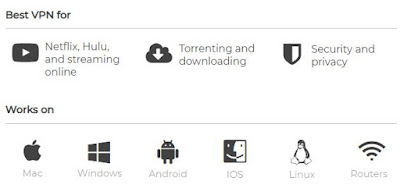
Private Internet Access has secured its spot as one of the most widespread and well-known Virtual Private Networks on the market. Now in its 7th year, this American-based company has thousands of servers worldwide and continues to be one of the most trusted names in the VPN space.
Private Internet Access

Benefits:

  • Very affordable plans (as low as $3.33 per month)
  • A plethora of security options, and features including Kill Switch and leak protection
  • The privacy policy is great - keeps no logs
  • A huge number of servers means a very consistent and reliable connection
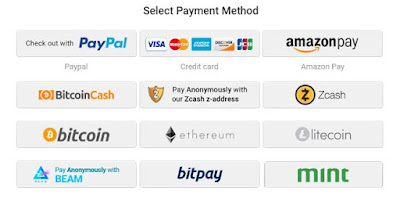
  • Variety of Hassle-Free Payment Methods to choose from.
    (Credit / Debit Card, Paypal, Amazon Pay, Bitcoin, Bitcoin Cash, Zcash, Ethereum, Litecoin, Beam. Bitpay, Mint and many more)
Private Internet Access

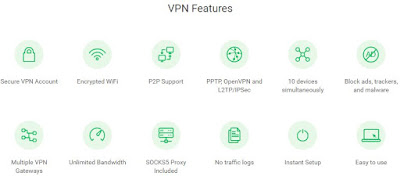
Features and Highlights

  • Secure VPN Account
  • Encrypted WiFi
  • P2P Support
  • PPTP, OpenVPN and L2TP/IPSec
  • 5 devices simultaneously
  • Block ads, trackers, and malware
  • Multiple VPN Gateways
  • Unlimited BandwidthSOCKS5 Proxy Included
  • No traffic logs
  • Instant Setup
  • Easy to use
Private Internet Access

Pricing and Plans

I had heard through the grapevine that Private Internet Access was one of the most affordable VPNs, and one look at their subscription options confirmed it. Their one-year plan comes out to just $3.33/month, which is half the cost of many VPN competitors. Even their one-month and six-month options are wallet-friendly - $6.95 for a one-month subscription and $5.99/month for 6 months.
Private Internet Access’s pricing is as simple as you can get. Each plan comes with unlimited bandwidth, and access to every PIA feature, such as 5 simultaneous connections and a built-in firewall.
Also, PIA has some unique payment options. In addition to the usual suspects like credit cards and PayPal, they also accept payments using a variety of retail gift cards, from Nordstrom to Starbuck’s.

Tests


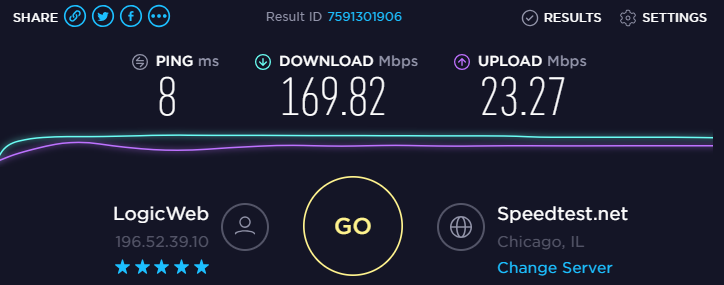
Since latency and download speed can – and often do – vary widely from one VPN to the next, one of the first things I do when trying a new VPN is going over to www.speedtest.net. These were my results before and after turning on Private Internet Access.

As far as security goes, our testing revealed no issues. A test on www.dnsleaktest.com showed our IP was masked correctly. And on www.ipv6leak.com, everything worked as intended.
Private Internet Access

Private Internet Access


Privacy
And as far as privacy goes, PIA doesn’t keep any logs. So, traffic logs, data transfer amounts, and session times aren’t recorded. This is a big plus since many other VPNs do keep a limited amount of logs.

Final Thoughts

Private Internet Access is one of the most well-known and trusted names in the VPN industry for a reason. The company has one of the best privacy policies, great security features, and a high degree of customization - and it’s all offered at a price that few can compete with. That being said, PIA is probably not the best option if you have high-performance needs, like a large amount of torrenting or streaming. The UI isn’t all that user-friendly either. If you don’t plan on using all of the features, and just want something simple, you may want to try it out before buying. Despite some of these shortcomings, I still highly recommend PIA as a complete and reliable VPN


GET DISCOUNTED DEAL NOW

Whatsapp for Desktop - How to Use it Free

The web service, which has been officially announced on WhatsApp's is here but it it relies on the mobile WhatsApp application

Follow the simple three steps to use it.

Step One: 


Update your Whatsapp Application on the phone.


[Android, Blackberry and Nokia S60 are supported up til now]

Step Two:


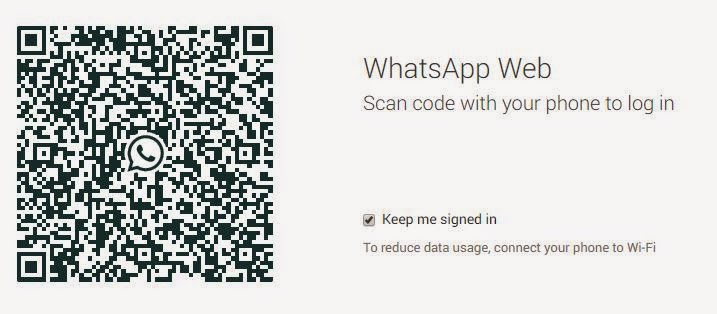
Go to Menu and Select "Whatsapp Web" it will open your camera application instantly


Step Three:

Use your Google chrome and open https://web.whatsapp.com 


Scan it with your mobile camera,
You will be immediately logged in automatically.

That's All..... Enjoy !!!

Skype Recorder Free Full Version Download


iFree Skype Recorder


Your 100% Full Version Skype audio call recorder


iFree Skype Recorder is a powerful and easy-to-use tool for recording Skype calls. You can free use it to record any Skype calls' audio streams.
It has the following advantages:
  • - It's FREE with no limits attached.
  • - Automatic or manual recording capabilities.
  • - Easy to be used in recording any type Skype calls's audio streams.
  • - Choice to record Skype calls different side(Local/Remote).
  • - Store your any Skype calls to MP3 format (Using Lame MP3 Encoder).
  • - Automatically chat reply when you leave computer.
  • - Easy to track record history.
  • - Built-in mp3 player.
  • - Very easy to use.


-OR-


Installation instructions

  • 1, Double click the iFreeRecorder.exe file you have downloaded. Click the "Next" button in the window of the installation program until navigate to the last page. and make sure you have Skpye installed.
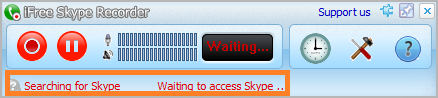
  • 2, iFree Skype Recorder will try to connect to Skype on the first start, and will be waiting for authorization. 


  • 3, Click "Allow Access" button to allow iFree Skype Recorder to use Skype when it pop up below message on the Skype.


  • 4, Click "Start Recording" button to record the Skype call when the call connected.


Download Goautodial CE 2.1 Free


Overview

GOautodial is an open source web based call center system based on CentOS. It automatically installs the GOautodial applications (GOadmin, GOreports and GOagent), Vicidial, Mysql, PHP, Asterisk, Limesurvey and other open source software to have a fully functional call center system. An open source predictive dialer and inbound IVR + ACD system that rocks.
GoAutoDial C.E. 2.1 can be downloaded from here:

Web based utilities

Vicidial SVN 2.4-309a BUILD: 110430-1642
Asterisk 1.4.39.1-vici
DAHDI 2.4.1
CentOS 5.6
Sangoma Wanpipe 3.4.20
VTiger CRM

Download  Goautodial CE 2.1 Free


Installation Guide


Weblink

Interested in Goautodial Latest Release,  Click Here


Goautodial CE 3.3 Time Synchronization Problem - Resolved


Updated: 4th August 2015


There is a time synchronization problem with your system, please tell your system administrator


The major cause for the time sync issue may be one of the following:
  1. The vicidial based system is using MeetMe conference , These MeetMe Conference Bridge requires a timing resources like Dahdi or Zaptel. if they are not loaded properly then time sync error occurs. 
  2. Different timing in server and agent systems 
  3. Wrong time set for DB, PHP or Server Time 
  4. You forgot to update the New server IP for the vicidial /goautodial. 

Troubleshoot 1:

MeetMe Conference dahdi issue

make sure the dahdi/zaptel driver is installed properly

If you are not using any telephony cards then you need to use the dummy drivers

type:
modprobe dahdi_dummy
dahdi_cfg -vvvvv
asterisk -vvvvvr
module unload chan_dahdi.so
module load chan_dahdi.so

Now login as agent and check whether the problem arises
For those using asterisk telephone cards like digium , sangoma ,allo use the below links Digium Sangoma Allo

------------------------------------------------------------------------------------

Troubleshoot 2:

Type "date" in the linux console , it will display the current server time. if the server time and timezone is wrong follow the below commands to change it.

rm /etc/localtime
ln -sf /usr/share/zoneinfo/Asia/Karachi /etc/localtime
rdate -s time-a.nist.gov
chkconfig ntpd on
ntpdate pool.ntp.org
/etc/init.d/ntpd start
------------------------------------------------------------------------------------

Troubleshoot 3:

Check the db time php time from the vicidial report section, if the time is different for all the three then follow the above troubleshoot and reboot the server.

------------------------------------------------------------------------------------

Troubleshoot 4:

If you have changed your server ip, dont forget to run the ip update script.

Type the below command to update:

/usr/share/astguiclient/ADMIN_update_server_ip.pl

and follow the onscreen steps , once done reboot the server and login as agent and check .

Note: if you face any error after executing this command ( eg: Perhaps the DBD::mysql perl module hasn't been fully installed ) Follow Troubleshoot # 7 for the resolution.

------------------------------------------------------------------------------------

Troubleshoot 5:


If you have very big setup of vicidial , then Dahdi_dummy will not be sufficient to provide time source , so you can use the Sangoma voice time sync USB stick

Link:https://wiki.sangoma.com/sangoma-wanpipe-voicetime


------------------------------------------------------------------------------------

Troubleshoot 6:

/usr/sbin/ntpdate -u pool.ntp.org


------------------------------------------------------------------------------------

Troubleshoot 7:

Example errors:

install_driver(mysql) failed: Can’t locate DBD/mysql.pm in @INC (@INC contains: Modules . /usr/lib64/perl5/site_perl/5.8.8/x86_64-linux-thread-multi /usr/lib/perl5/site_perl/5.8.8 /usr/lib/perl5/site_perl /usr/lib64/perl5/vendor_perl/5.8.8/x86_64-linux-thread-

How to Install Perl DBD::MySQL, Use the following manual installation.

Below is the step,

Run from Shell.
perl -MCPAN -e shell (use Auto configurations if prompted)
Type in,
cpan> install DBD::mysql
Wait for the installation.

Thats all!!
------------------------------------------------------------------------------------

Troubleshoot 8: The Last Hope

Some cases are found that goautodial 3.0 was creating time sync issues on some sever hardware.

well in this case, follow these TWO steps only.

Install Goautodial 2.1 on the same server, (there should not be any time issue, if yes, check steps 1 to 6 again)

Download Goautodial 2.1

Installation Guide

Then upgrade it to 3.0 (using upgrade method from below)

Upgrade


I dont know what is the magic in this. but it works :) even when the system and the server time mismatches.

Contents of Step 1 to 5 are taken from Striker24x7

Free Online Streaming - Online TV Sports Channels

Sports Cricket Football Hockey Racing Tennis Drama Action Movies Theater Cartoons News Free Streaming Live TV Channels


You can now view all free from below renowned and working websites.


Concurrent RDP Patcher Enables Remote


Concurrent RDP Patcher


Enables Multi Remote Desktops in Windows Vista Win7 and Win 8

Step 1:

Go to Control Panel ►System ► Advanced System Settings ► click on the Remote tab.
or Pressing the WIN Key+ Pause/Break keys simultaneously brings up the System window.


Select Users (other than Administrators), you want to give access to Multi Remote Desktop Connection

Step 2:

This tool enables the Remote Desktop Connection for Windows 7. This patcher also allows you to revert the changes back to the way it was by clicking the Unpatch button. 

The password to extract the archive is: raymondcc

Note that this version of Concurrent RDP Patcher patches the DLL on Windows 7 RTM, Service Pack 1 and update KB3003743 which was released in October 2014.

Important Updates For 2019 (And October 2018)

For four years the termsrv.dll file wasn’t changed and the Concurrent RDP Patcher worked fine from October 2014 onwards. Recently though, Microsoft made changes to the DLL and it broke the patcher with Rollup update KB4462923 released in October 2018. If you are still running with that update or have not yet installed any Rollup updates beyond January 2019, we have a dedicated Concurrent RDP Patcher that works with it.
The password to extract the archive is: raymondcc

Unfortunately, it’s only been a few short months and Microsoft has yet again changed the termsrv.dll to break the patcher once more. The offending update is Rollup update KB4486563 released in February 2019. The January 2019 Rollup Preview (KB4480955) also contains the same DLL file. We have created a new patcher that should work for this latest update.

The password to extract the archive is: raymondcc

NOTICE: Please be aware that the Feb 2019 version of the patcher has not been extensively tested so it should be considered as alpha/beta software and could contain bugs. Please use it with care and at your own risk. Of course, we welcome any feedback on how this latest patched version works for you.

Concurrent RDP Patcher fixed versions work on 32-bit and 64-bit Windows 7 Service Pack 1 and newer. Starter, Home Basic, Home Premium, Professional and Ultimate are supported, but not Enterprise. We will do our best to update the Concurrent RDP Patcher if there are any more updates to the termsrv.dll library in 2019. Support for Windows 7 ends in January 2020 so there aren’t likely to be any more updates after this time.

April 2019 Test Version

Microsoft has updated the DLL for the second time in 2019 and enjoys making life more difficult! Rollup update KB4493472 will break things again. The below patcher is a test version and should be treated as such on 64-bit and 32-bit Windows 7 so please take care when using it.

The password to extract the archive is: raymondcc


For Windows 8

Windows 8 and 8.1 users please download the patched termsrv.dll file from here and edit the following registry keys at HKLM\System\CurrentControlSet\Control\Terminal Server.

Replace this file in C:\Windows\System32


Convert .BBB to IPD / CSV /ZIP Free -Manage Blackberry data

Blackberry Backup contents Import in Other Platforms.

You may wondering for converting your Blackberry backup, here are my research
results, summarized in 4 points only and most Importantly, I am presenting you all free tools.

Once you have CSV file, check the support format of your device and alter the CSV file accordingly for Easy and correct import.

1) BBB to IPD

Change the extension of the .BBB file to .Zip and extract it.
The folder named "databases" contain the .ipd file.

2) IPD to BBB

This is a tool (https://www.processtext.com/abcblackberry.html) that converts from .ipd to .bbb

3) BBB to CSV

Free tool for this conversion, Magic Berry is a simple tool that lets you manage data stored in BlackBerry backup files

https://magic-berry.software.informer.com/

4) IPD to CSV

This open source simple tool that will convert IPD to CSV.


Android -Introduction at a glance


Android, the world's most popular mobile platform
Android powers millions of phones, tablets, and other devices and brings the power of Google and the web into your hands.
With an amazingly fast browser, cloud sync, multi-tasking, easy ways to connect and share and the latest Google apps (and thousands of other apps available on Android Market) your The android-powered device is beyond smart.

Quick and easy browsing
The Android browser puts the web at your fingertips. View multiple open pages at once, use incognito mode to browse privately and sync your Google Chrome bookmarks so all your favorite sites are with you on-the-go. And save any web page to read when you’re offline—handy for mobile boarding passes, train schedules, and your favorite news articles. Fast, powerful and easy, just like on your computer.

Master your photos and connect with friends and family
Android makes it easy to shoot, edit and share photos and videos quickly. Capture those special moments in your life. With one-touch sharing, you can share immediately with family and friends, without switching apps or losing your original. You can even use your camera to video chat with Google Talk, or participate in a Google+ hangout.

All your email, anytime, anywhere
Gmail makes mobile email fast, fun, and approachable. You can swipe between conversations to catch and search for emails even when you don’t have a data connection. With seamless contacts integration and instant access to your latest mail, Gmail can play a crucial role in your online experience, no matter where you are or what device you're using.

Maps with turn-by-turn navigation, Places, and Latitude
Google Maps on Android comes with Places, Latitude, Navigation and Street View. Get free, turn-by-turn GPS navigation for driving, walking, and public transit directions to easily find your way.

Control your Android device with your voice
Android listens to you. Use your voice to command your device and use voice typing to speak to type emails, SMS or even search the web. More than 20 languages supported.

Beam from one phone to another
Sharing with people close by has never been easier or quicker. Use Android Beam to share contacts, web pages, YouTube videos, directions, and apps—all with the power of Near Field Communication (NFC). Just touch two NFC-enabled Android devices back-to-back, then tap to beam whatever's on the screen to your friend.

Face Unlock
Using state-of-the-art facial recognition technology, you can now open some Android devices with a smile. Just grab your phone with one hand, turn it on, and look at it—and you're in. No complicated passwords to remember.

Customize your Android device
Widgets let you interact with your favorite apps right from your Home screen. You can add and resize your calendar, email feed, important Google+ posts, and more, so the important stuff in your life is right there within reach.


AVG released 2014 products for Internet Security, Antivirus and Antivirus Free. AVG’s site is undergoing design changes at the time of writing this article, AVG 2013 turned to be full featured and system resource hog, what to expect in AVG 2014 free antivirus? we haven’t got out hands on it ? but you can download AVG Antivirus Free 2014 now offline installer and taste its new features.
Download AVG antivirus free 2014 (All Languages)
Update: AVG keep changing links, so try to download offline installer from the link

AVG AntiVirus Free - for Linux

AVG AntiVirus Free - for Linux
Basic antivirus protection for Linux/FreeBSD available to download for free. Free virus protection for your PC.


NameVersionTypeDateSize
AVG Free Edition for Linux (avg2013flx-r3118-a6926.i386.deb)2013.3118debDecember 17, 2013126 MB
AVG Free Edition for Linux (avg2013flx-r3118-a6926.i386.rpm)2013.3118rpmDecember 17, 2013126 MB
AVG Free Edition for Linux (avg2013flx-r3118-a6926.i386.sh)2013.3118shDecember 17, 2013126 MB
AVG Free Edition for Linux (avg2013flx-r3118-a6926.i386.tar.gz)2013.3118tar.gzDecember 17, 2013126 MB
AVG Server Edition for FreeBSD (avg2013ffb-r3115-a6155.i386.tar.gz)2013.3115tar.gzMarch 13, 2013101 MB

All Contents from AVG Official Website

GWBASIC Version 3.22 - Download Practicals and Guide


GW-BASIC or Gee-Whiz BASIC was a dialect of BASIC developed by Microsoft from BASICA, originally for Compaq. GW-BASIC has a command line-based Integrated Development Environment (IDE) based on Dartmouth BASIC. It also includes function key shortcuts at the bottom of the screen. Like other early microcomputer versions of BASIC, GW-BASIC lacked many of the structures needed for structured programmings such as local variables, and GW-BASIC programs executed relatively slowly, due to the fact that it was an interpreted programming language. All program lines must be numbered; all non-numbered lines are considered to be commands in direct mode to be executed immediately. Program source files are normally saved in a binary compressed format with tokens replacing commands, with an option to save in ASCII text form.
The GW-BASIC command-line environment has commands to RUN,LOAD,SAVE,LIST the current program, or quit to the operating SYSTEM; these commands can also be used as program statements. There is little support for structured programming in GW-BASIC. All IF/THEN/ELSE conditional statements must be written on one line

Click here Download  Free  GWBASIC  executable

Click here Download Complete GWBASIC Material + Practicals


Note: All versions above are for a 32-bit version of windows if GWBASIC not working for you, then you might have 64-bit windows, please refer below steps.


FOR 64 BIT OPERATING SYSTEMS: 
(Win 7, Win8, Win 8.1, All version OS)

You need to download and install DOSBox first. Download

Make a folder in C Drive "GWBASIC" and place gwbasic3.exe in it.

Open DOSBox: Enter the following commands one by one:

mount c: c:\ 
c:
CD GWBASIC 
GWBASIC3


Links:

Download DOSBox for Windows
Download DOSBox for MAC
Download DOSBox for Linux

Download SketchUp Pro


You can use SKETCHUP to create, modify and share 3D models. SketchUp is software that you can use to create 3D models of anything you like. Most people get rolling with SketchUp in just a few minutes. Redecorate your living room. Design a new piece of furniture. Model your city for GoogleEarth. Create a skatepark for your hometown, then export an animation and share it on YouTube. There's no limit to what you can create with SketchUp

You can build models from scratch, or you can download what you need. People all over the world share what they've made on the 3D Warehouse. It's a huge, searchable repository of models, and it's free.
A smarter way to think about 3D modeling
You won’t believe how easy it is to use SketchUp Pro. We’ve vastly simplified the process of building and documenting 3D models.


Watch LIVE Cricket Score !!!

Sports Cricket Football Hockey Racing Tennis Drama Action Movies Theater Cartoons News Free Streaming Live TV Channels


You can now view all free from below renowned and working websites.


Private Internet Access - The Best Safer VPNWhatsapp for Desktop - How to Use it FreeSkype Recorder Free Full Version DownloadDownload Goautodial CE 2.1 FreeGoautodial CE 3.3 Time Synchronization Problem - ResolvedFree Online Streaming - Online TV Sports ChannelsConcurrent RDP Patcher Enables RemoteConvert .BBB to IPD / CSV /ZIP Free -Manage Blackberry dataAndroid -Introduction at a glanceAVG Free Antivirus 2014 [Download from Offline Installer] Windows / LINUXGWBASIC Version 3.22 - Download Practicals and GuideDownload SketchUp ProWatch LIVE Cricket Score !!! ~ Technology